

Homepage carousels exist to settle internal arguments, not to convert customers
Your carousel is a compromise between departments. Here’s what your homepage should do instead.
Nobody’s customers asked for a carousel. Nobody has ever landed on a homepage and thought, “I wish this had five rotating banners.”
Carousels are on your homepage because three people in a meeting each wanted their thing “above the fold,” and rotating slides let everyone leave the room happy. It’s a design decision made entirely for the people inside your company.
We were reminded of this not too long ago. A new client came to us still running a carousel, one their previous designer either suggested or never talked them out of. We were a little stunned, honestly. Not at the client—they were just trusting their designer’s advice. We were surprised the advice was ever given—or not given, depending on how you look at it. Needless to say, we’re happy to retire it and put that homepage real estate to work.
Where carousels came from
Carousels showed up when rotating banner plugins made it trivial to cram five messages into one slot without redesigning the page. Every stakeholder in the room got a slide, nobody had to lose an argument, and it felt like a clever compromise.
Here’s the part that’s harder to excuse: the warning signs were available the whole time, in every designer’s and stakeholder’s own browsing habits. Nobody sat through someone else’s slideshow. Nobody waited around for slide two and three and four of a website’s rotating banner. People scrolled past carousels on other sites constantly, and still put them on their own homepages. Hindsight makes this look obvious now, but it should have been obvious then too. The evidence was everyone’s own daily habit of completely ignoring the carousel.
The numbers are brutal
The most cited carousel data comes from Erik Runyon’s tracking of the University of Notre Dame’s homepage. Across millions of visits, only about 1% of visitors clicked a feature at all, and position one took roughly 89% of those clicks. Slides two through five split the scraps.
So the compromise doesn’t even deliver what each department thought it was getting. The department in slide four has a spot on the homepage in the same way a tree has a spot in a forest.
The carousel costs you more than it earns
Carousels aren’t just ineffective. They cost you in ways nobody puts in the meeting notes.
- Speed — Every slide is a large image, and most of them load whether or not anyone ever sees them. Your homepage is usually the heaviest page on your site, and it’s the one visitors and Google judge first.
- Accessibility — Content that moves on its own and can’t be paused is a known barrier for people with cognitive disabilities, low vision, or motor difficulties. Web accessibility guidelines (WCAG) require a way to pause, stop, or hide auto-moving content, and plenty of carousels don’t offer one.
- Mobile — On a phone, a carousel competes with the swipe gesture visitors use to scroll the page, so people accidentally flick past slides or get stuck inside the widget.
With a carousel, you’re paying for a feature that 99 out of 100 people ignore.
Note: Before carousels were collectively banned from professional web design, we did spend a short while trying to make them slightly more effective, by replacing embedded text in images with overlaid, scannable text that Google could read, and by slowing the speed of the average carousel so that 1% of users actually had time to read the messaging.
I watched this happen at Bell
I saw the carousel fight up close while working on bell.ca. Four lines of business (Home Phone, Mobile, Internet, and TV), and multiple product owners within each, all clamoring for a slide on the homepage. For starters, everyone seemed to be in denial about banner blindness, and on top of that, everyone should have known that nobody other than the product owners would be willing to sit and wait for anything past slide #1. Nobody was asking what a customer landing on the page really needed. Instead, we were asking how to keep every business line satisfied, and we ended up building a system with supposedly-fair rotation rules and a tracking spreadsheet to referee it.
That’s the tell. When you need a governance system to manage who gets a slide, you’ve stopped designing for customers and started designing an org chart. The system wasn’t the solution. It was the symptom. (It’s also what happens when a marketing department has too much power, but I’ll save that debacle for another post.) Yet, Bell still uses homepage banners to this day!
Progressive designers moved on a long time ago
Carousels feel like a relic to anyone who’s been paying attention. Back in 2012, Happy Cog, one of the most respected names in web design, unveiled a new homepage with a single large statement, with the keywords doubling as navigation: We CREATE beautiful websites, PUBLISH our best ideas, and SPEAK to a worldwide community. Find out more ABOUT us.
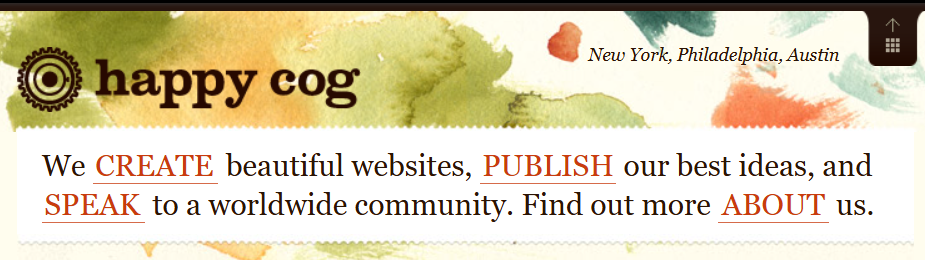
There was no slideshow and no hunting. A visitor knew what the company did and where to go next within seconds.
We brought this discovery back to management at an agency some of us worked at, expecting it to land well. But it didn’t. The feeling in the room was that carousels were what clients came in asking for, and it wasn’t our job to talk them out of it. Thankfully, we pushed back. We argued that clients hire an agency for judgment, not just execution, and that meant educating them, not just building whatever they pointed at. We changed our own approach across every site we touched, including our own.
What to put there instead
Your homepage is the most valuable online real estate you own, and it only gets a few seconds to make an impression. Use it to tell people exactly what you do and where you do it, in one clear statement, and let that statement build the trust a carousel never could:
- Use words that explain what you do, in plain language, at a size people can actually read.
- Use equal-weight links (text or graphical) to the sections of your site that matter, so no single message wins by being first in the queue.
- For pages that have a logical, hierarchical home deep in your sitemap, use the homepage to steer users toward that content.
Every link should be visible at once, and nothing should rotate out of view before someone can read it. At Firefly, this is often a sentence-nav style opener, similar to the Happy Cog approach, or a single punchline statement paired with static, equal-weight links underneath. Either way, a visitor understands what you do and where to go, without waiting on a slideshow.
What to say when someone asks for a slide
This is the section to forward to whoever keeps getting the request. Ask these questions in the room:
- “What should a visitor do after seeing this?” If there’s no clear action, it’s an announcement, not a homepage priority.
- “Would you put this in the main navigation?” If not, it doesn’t belong on the most valuable page you own.
- “What do we take off to make room?” A carousel lets everyone avoid this question. A static homepage forces it, and that’s the point.
- “How will we know it worked?” If nobody can name a metric, the slide is there for visibility, not results.
Here’s the blunt version: a department wanting to be seen isn’t a customer need. Give them a proper page deeper in the site with a link from a logical spot, and they’ll get more qualified traffic than a rotating slot ever gave them.
But what if someone insists?
Sometimes the request comes from the top, and “the data says no” doesn’t end the conversation. Don’t fight it. Reframe it. Offer a static hero with one primary message and equal-weight links below it, and propose measuring it against the carousel for a month. It gives the stakeholder a way to say yes without losing face, and most of the time the numbers settle the argument for you.
The fair caveat
There are places carousels work. Runyon’s own follow-up data showed an auto-playing news site drawing a much higher click rate, around 9.4%, and a Smashing Magazine study found most mobile shoppers advance product image galleries.
That distinction comes down to intent. A visitor scrolling a golf course’s gallery of the grounds, or a restaurant’s photos of its dishes, has already decided they’re interested and wants to browse. They’ll click through because they’re choosing to. That’s a completely different job from a homepage banner trying to win someone’s attention in the first five seconds, competing against four other messages for it. If your carousel is a gallery a visitor opts into, fine. If it’s a compromise between departments sitting in the way of your first impression, it’s not doing anything for your visitors.
What to do about it
Check your analytics. Look at click-through by slide position. If slide one gets nearly everything, you already have your answer. Then have the harder conversation: who is this really for?
A designer or agency with real UX design and content design experience will always come back with a better answer than a carousel. It’s not a hard problem, it just takes someone willing to say no to the easy compromise.
Get a free homepage evaluation